Appearance
Studies
The Studies module is the central hub of the Study Setup application. Every other module — changesets, document reviews, provisioning, and outputs — is scoped to a study.
Mockup
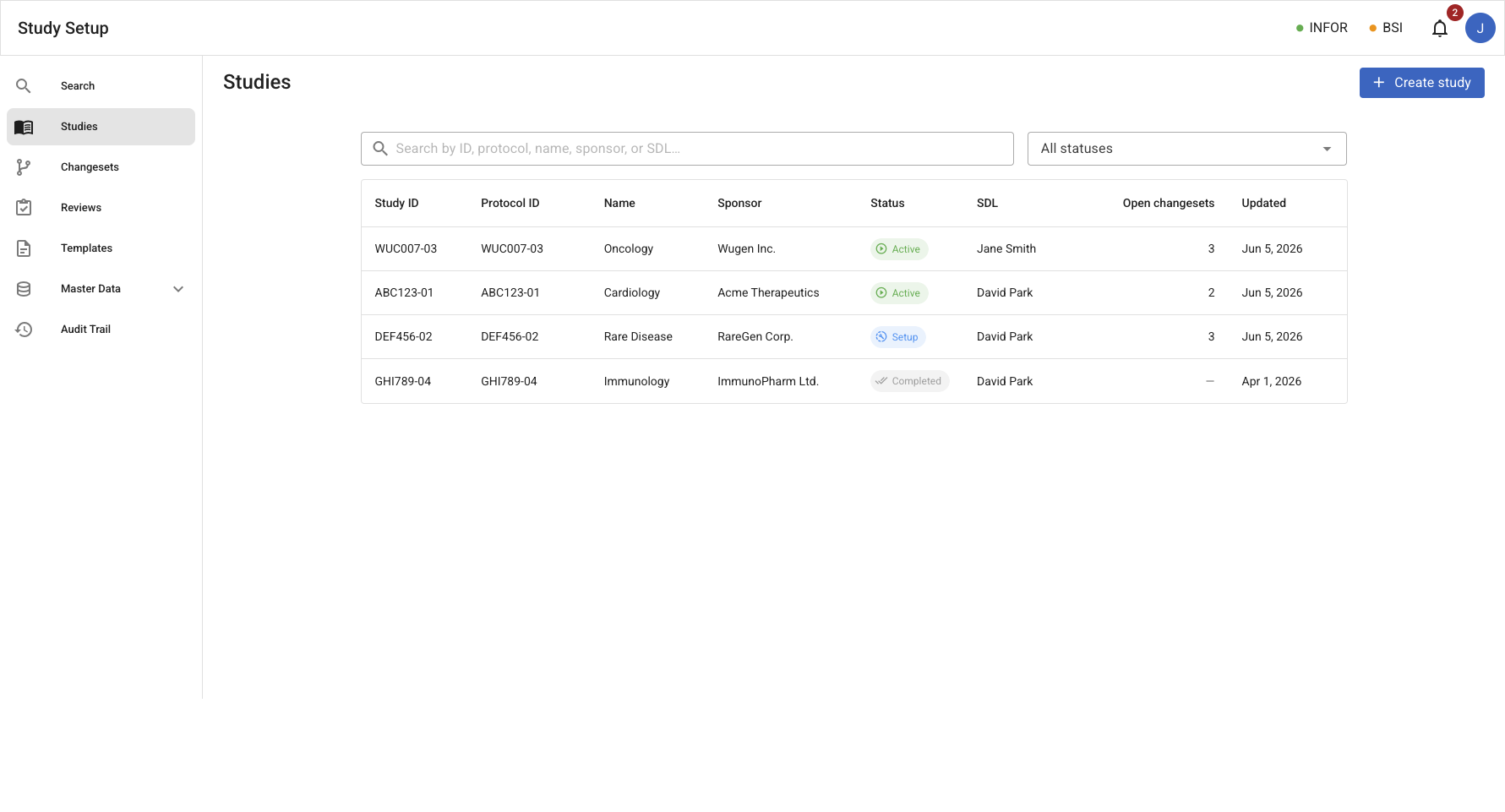
Studies list
/studies – Searchable, filterable table of all studies.
Study detail
/studies/:id – The study detail view, a tabbed view showing the study's inputs, readout, attributes, provisioning, outputs, and checkpoint history. The page header shows the study's current checkpoint (the latest committed model snapshot); clicking it opens the History tab.
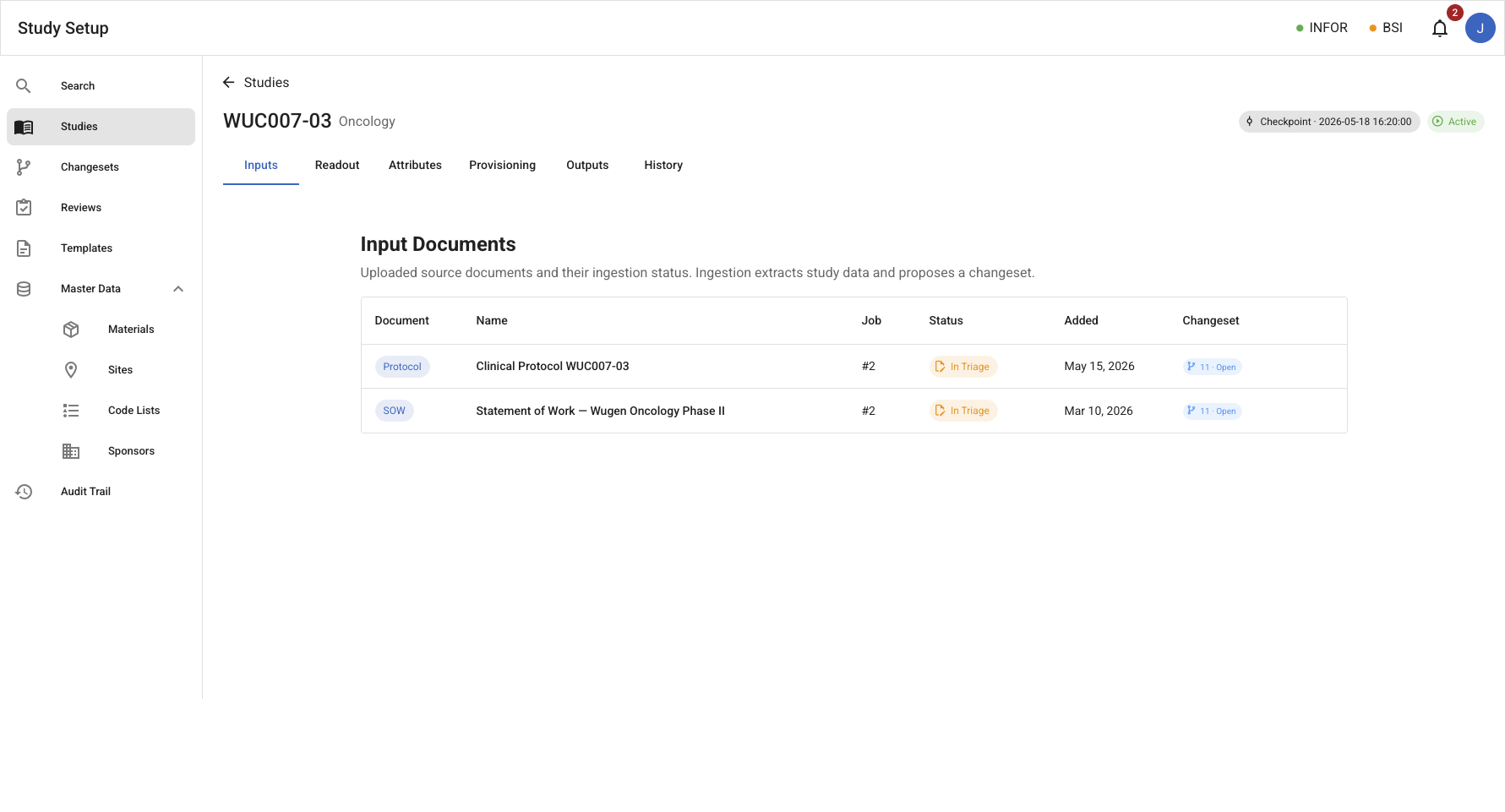
Inputs tab
/studies/:id/inputs – Shows uploaded input documents (typically, SOW and Protocol) for a study.
Readout tab
/studies/:id/readout – Shows the study's readout, a summary of the study's attributes and their values in a readable, interactive, format.
Attributes tab
/studies/:id/attributes – The central comparison and triage surface. The fixed columns are Field and Study Model; additional columns appear for each contributing source and each in-flight changeset:
- Source columns (SOW, Protocol): populated by ingestion jobs and show the raw extracted value for reference. Headers link to the corresponding input document view.
- Remote system columns (BSI, Smartsheet, Infor): reflect values tracked in external systems. Rows where a remote value diverges from the Study Model are highlighted in amber and expose a Resolve (
update_remoteorupdate_model) and Mute action. - Proposed columns: one per open or submitted changeset. Ingestion-originated changesets are badged with an ingestion label alongside the changeset ID. Rows where a proposed value differs from the Study Model are highlighted; the analyst reviews via the standard changeset flow.
The tree collapses and expands by assay, with nested timepoints, collection supplies, and transfer vials.
Provisioning tab
/studies/:id/provisioning – Shows the study's provisioning, a summary of the study's provisioning actions and their status. See Provisioning for more details.
Outputs tab
/studies/:id/outputs – Lists the study's configured output documents. Each row shows an output Document Type, the currently selected template, the latest released Document Version (if any), and a staleness indicator when the document has drifted from its last released version. The SDL manages which output types the study produces and which template each uses.
SDL capabilities on the Outputs tab:
- View all output types — see every output Document Type configured for the study alongside its selected template name and version, latest released version label, and staleness status.
- Change the template — swap the selected template for an output to any other template registered for that Document Type.
- Clone and customize — clone a master template into a study-scoped variant and immediately point the output at the clone. The clone is editable in the template editor and is derived from the master; changes to the master do not propagate to the clone.
- Add an output type — add any output Document Type that is not yet in the study's outputs (chosen from the unused set).
- Remove an output type — drop an output Document Type from the study's outputs.
- Navigate to review — open the Document Review view for any output directly from this tab.
Document review status, versioning, release management, and the Internal Review / Release Candidate lifecycle are defined in Document Review.
History tab
/studies/:id/history – Lists every checkpoint for the study in reverse chronological order. Each row shows the checkpoint timestamp, a short summary of what changed, the source (Initial for the registration snapshot, or a changeset ID for every subsequent checkpoint), and who applied it. The current checkpoint is marked Current. Changeset rows link to the source changeset detail.
Entities
| Entity | Description |
|---|---|
| Study | The primary entity. Identified by a canonical Study ID (e.g. WUC007-03) that is aligned with the BSI shell identity and clinical protocol. Holds governed metadata: visit schedules, sample workflows, kit rules, lab routing, etc. |
| Checkpoint | An immutable snapshot of the study model produced whenever an approved changeset is applied. Checkpoints are identified by a time-ordered ID (YYYYMMDD.HHmmss.{UUIDv7}). An initial checkpoint is created at study registration. |
| Changeset | A proposed set of changes to the Study Model that the Study owners may approve or reject. Identified by a numeric ID assigned at creation (e.g. 1, 11). |
| Study Output | A study-scoped binding that pairs one output Document Type with a selected Template. A study has at most one Study Output per Document Type. The selected template may be a master template or a study-scoped clone. |
Study Lifecycle
mermaid
stateDiagram-v2
    [*] --> Draft : study created
    Draft --> Active : activate
    Active --> Frozen : freeze
    Frozen --> Active : unfreeze
    Active --> Archived : archive
    Frozen --> Archived : archive
Archived --> Draft : restore| State | Meaning |
|---|---|
| Draft | Study will not trigger provisioning actions, generate alerts, etc. This state is used to keep a Study "silent" while its very initial details are being loaded. |
| Active | Live study participating in all regular operations, triggering notifications, sub-processes, and supporting document reviews. |
| Frozen | The study is temporarily locked against model changes: Changeset submission and application are blocked (no new checkpoints). Existing document reviews, RC activity (comments, dispositions), and provisioning continue unaffected. The SDL freezes a study when review cycles are converging and concurrent model changes would be disruptive. Transitioning back to Active immediately re-enables changeset submission. |
| Archived | Pauses the study's interactions in the app, as in Draft, but is also excluded by default from listings. |
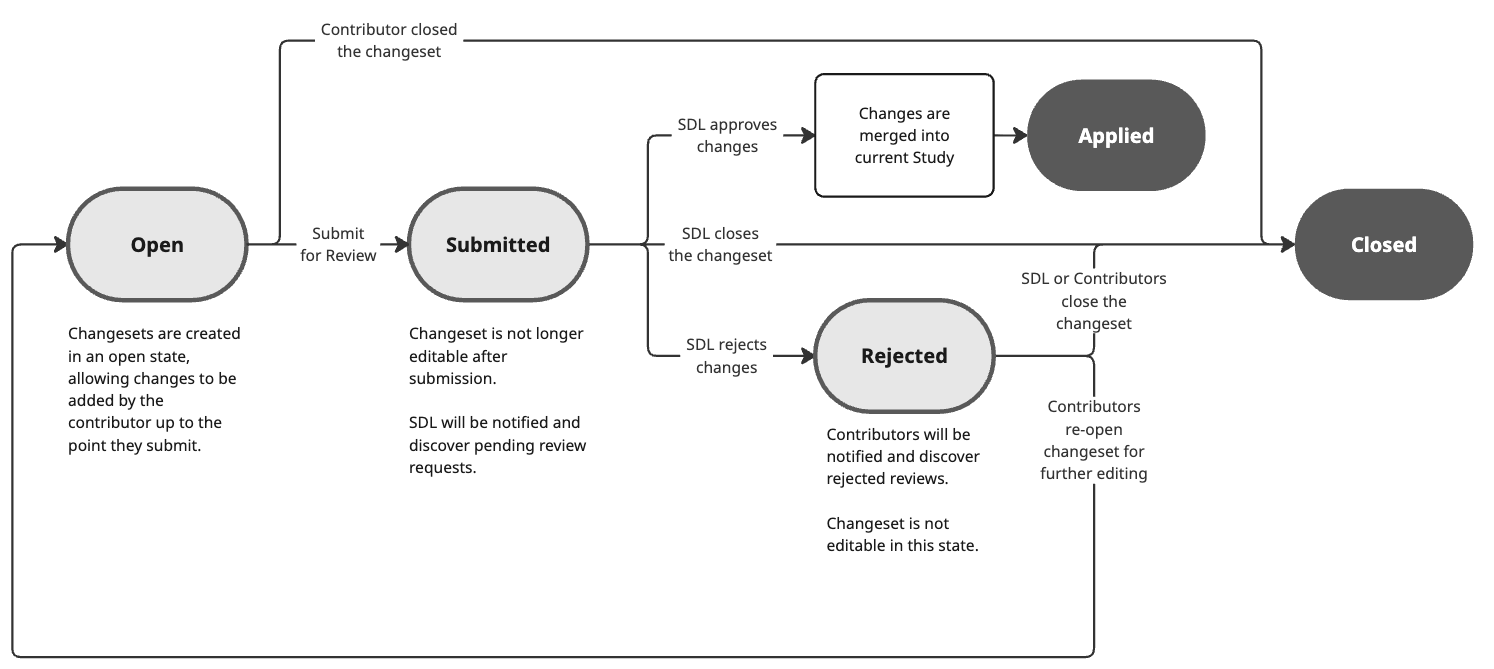
Changeset Lifecycle
Changesets may be created at different points in time in the application:
- An authorized user may visit a Study and enter a change directly in the Readout, Attributes view or through an Output document; this will initiate a changeset to which all proposed changes are added to then be submitted by the user.
- During a Document Review an internal contributor may identify fields that need change. The proposed changes are packaged into a changeset for review.
- A completed Ingestion Job automatically creates a pre-populated changeset containing every extracted field that differs from the current Study Model.
Freeze restriction: When a study is Frozen, Changeset submission and application are blocked. No new checkpoints can be created until the study is unfrozen. Open Changesets are preserved; they may be submitted once the study returns to Active.
| State | Meaning |
|---|---|
| Open | The changeset is being assembled. All associated contributors may add proposed changes, and any contributor may submit it for review or close it. |
| Submitted | The changeset has been submitted and is no longer editable. The SDL is notified and can approve, reject, or close it. |
| Applied | The SDL approved the changes and they were merged into the current Study, producing a new checkpoint. Terminal state. |
| Rejected | The SDL rejected the changes. Contributors are notified; the changeset is not editable in this state but can be re-opened for further editing or closed. |
| Closed | The changeset was closed without being applied or rejected (by a contributor while open, or by the SDL/contributors from another state). Terminal state. |
Use Cases
- Register a new study with Study ID, Protocol ID, name, sponsor, and SDL.
- Browse and filter all studies by status, free-text (ID, protocol ID, name, sponsor, SDL).
- View a study's uploaded input documents (SOW, Protocol) and navigate into the document viewer.
- View a study's generated output artifacts (PSD, KDF, POP, Lab Manual) and navigate into the document viewer.
- Monitor open changesets per study from the studies list.
- Transition a study's lifecycle status (draft → active → frozen → archived and back).
- Review drift between the current Study Model and original input documents and remote systems
- Browse all study model attributes in a tree table showing Field · Study Model · per-source columns (SOW, Protocol, BSI, Smartsheet, Infor) — only sources that have tracked values appear as columns.
- Identify attribute-level drift: rows where a remote system or source document disagrees with the committed Study Model are highlighted.
- Resolve drift by choosing to push the Study Model value to the remote system (
update_remote) or to pull the remote value into the Study Model as a proposed change (update_model). - Mute drift alerts for a specific attribute–source pair to suppress known, intentional divergences.
- Open the input document detail from an Attributes source column header to review extracted data and job logs for a contributing ingestion job.
- View the study's current checkpoint from the study header and browse full checkpoint history on the History tab.
- View all output Document Types configured for a study and the template selected for each.
- Select or change the template used for a study output (picking from all templates registered for that Document Type).
- Clone a master template into a study-scoped variant and assign the clone as the template for an output.
- Freeze a study to block Changeset submission while review cycles converge.
- Unfreeze a study to re-enable Changeset submission.
- Navigate to the Document Review view for any output from the Outputs tab.
Notes
- A study's Study ID and Protocol ID pair must be unique; duplicate pairs are rejected at creation.
- Attempts to upload a new input document while an ingestion job is still in progress (for the same input type) are rejected.
Events
| Event | Description | Requirement |
|---|---|---|
StudyCreated | A draft study was created | SS-001 |
StudyActivated | A draft study was activated | SS-001 |
StudyFrozen | An active study was frozen (changeset submission blocked) | SS-001 |
StudyUnfrozen | A frozen study was unfrozen (changeset submission re-enabled) | SS-001 |
StudyArchived | A study was archived | SS-001 |
StudySetToDraft | A study was set (back) to Draft status | SS-001 |
CrosswalkIdLinked | An external crosswalk ID (protocolId, bsiStudyId, smartsheetRowId, inforProjectCode) was associated | SS-002 |
StudyModelUpdated | Structured study metadata was updated (fields, value state), creating a new checkpoint | SS-003 |
ChangesetCreated | A set of proposed changes was created | SS-004 |
ChangesetSubmitted | A set of proposed changes was submitted for review | SS-004 |
ChangesetApplied | A changeset was fully or partially applied to the Study | SS-004 |
ChangesetRejected | A changeset was entirely rejected | SS-004 |
ChangesetClosed | A changeset was closed without being applied or rejected | SS-004 |
DriftMuted | One or more specific attributes are flagged to not raise drift alerts for a specific remote system | SS-012 |
DriftDetected | A tracked external system was found to differ from Study Setup | SS-012 |
DriftResolved | A decision was made on how to resolve a drift situation: update_remote or update_model | SS-013 |
Pending definitions
- [ ] Specific workflows around drift resolution