Appearance
Source Ingestion
The Source Ingestion module automates the extraction of study requirements from uploaded source documents into a structured, version-controlled study model. An AI pipeline parses each document, diffs the extracted data against the current Study Model, and packages the differences as a Changeset for SDL review.
Mockup
Study detail – Inputs tab
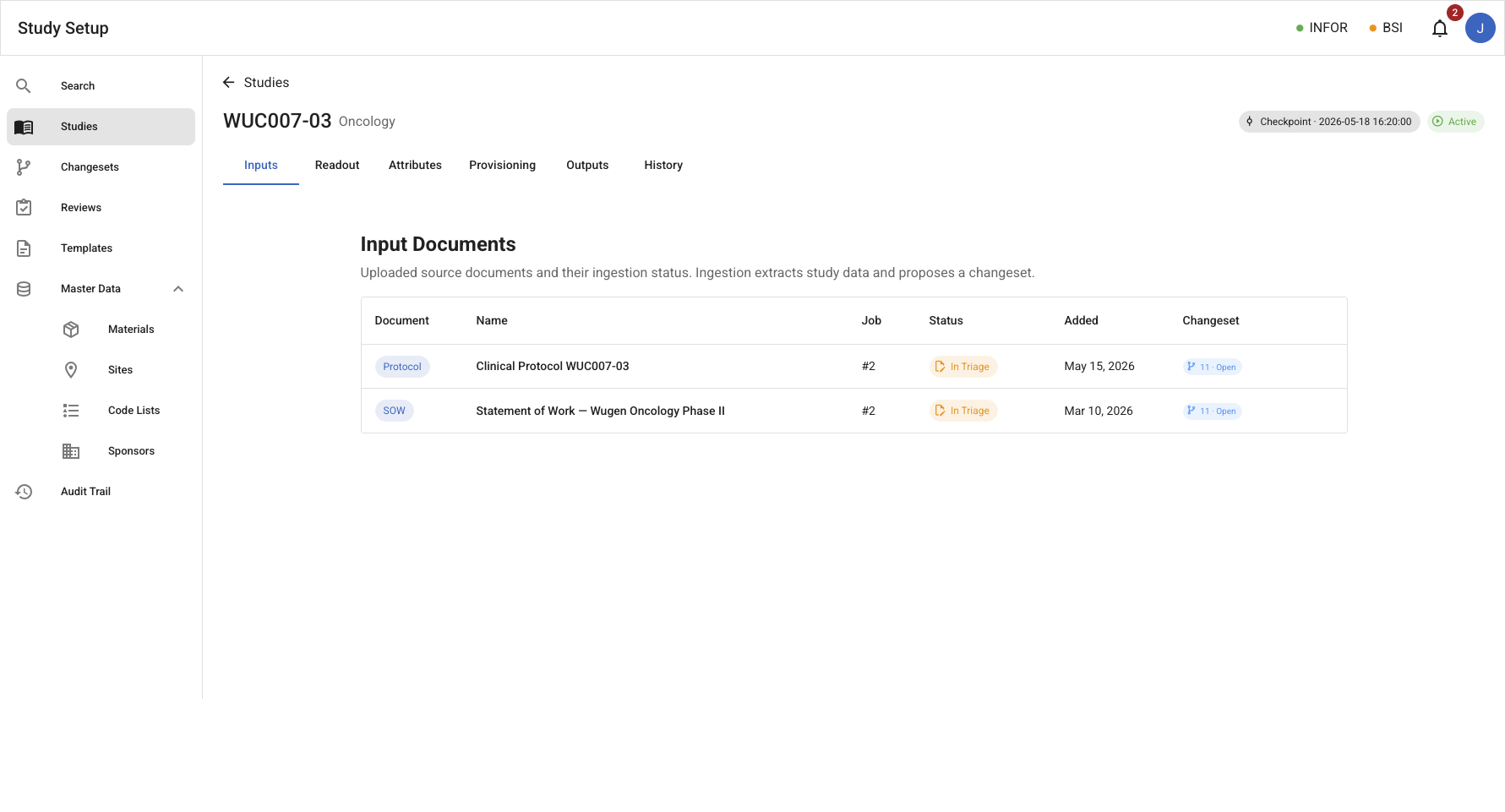
/studies/:id/inputs – Document list where each input row shows the status of its associated ingestion job and linked changeset inline. A Run Ingestion button appears when no job is in Triage; it is disabled (with explanation) while a changeset is outstanding.
Input document view
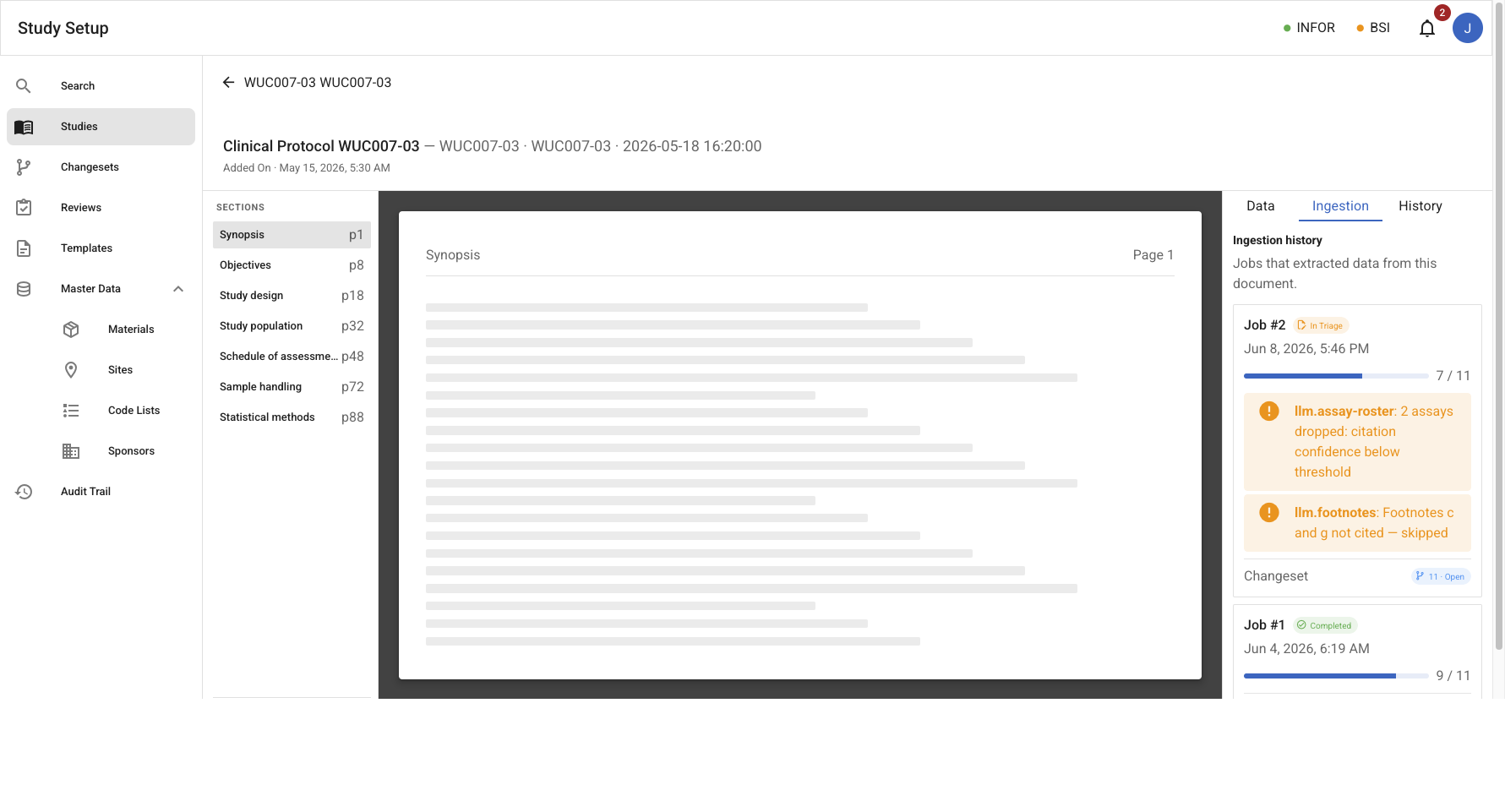
/studies/:id/inputs/:documentId – Document preview with a right-hand sidebar. The sidebar has three tabs — Data (per-section attributes extracted from this document, with source spans and confidence), Ingestion (parser run history, partial-run warnings, and a link to the associated changeset), and History.
Study detail – Attributes tab
/studies/:id/attributes – The triage surface. In addition to the Study Model and source-document columns (SOW, Protocol), an ingestion-sourced Proposed column appears for each open or submitted changeset linked to an ingestion job. Each proposed column is badged with the changeset ID and an ingestion label. Rows where a proposed value differs from the Study Model are highlighted; the analyst reviews and approves the changeset through the standard SDL flow.
Entities
| Entity | Description |
|---|---|
| Ingestion Job | An asynchronous task that executes the extraction pipeline for one source document. Created when a source file is uploaded or when ingestion is re-triggered. On completion, creates a pre-populated Changeset (see Studies) containing every extracted field that differs from the current Study Model. |
| SourceDocument | An uploaded source file — PDF, Word, or Excel — (SOW, Protocol, or historical artifact) attached to a study. Stores doc kind, file format, file path, the parsing adapter used, and page count where applicable. |
| ParserRun | A single LLM parser invocation against one document chunk. Records parser ID, chunk ID, status (succeeded/partial), raw input, raw output, error notes, and the attribute count produced. |
| AttributeSet | The collection of extracted attributes produced by one or more parser runs, with provenance: extractor type, parser ID, confidence, and source spans. Retained on the job for display in the input detail sidebar. |
Ingestion Job Lifecycle
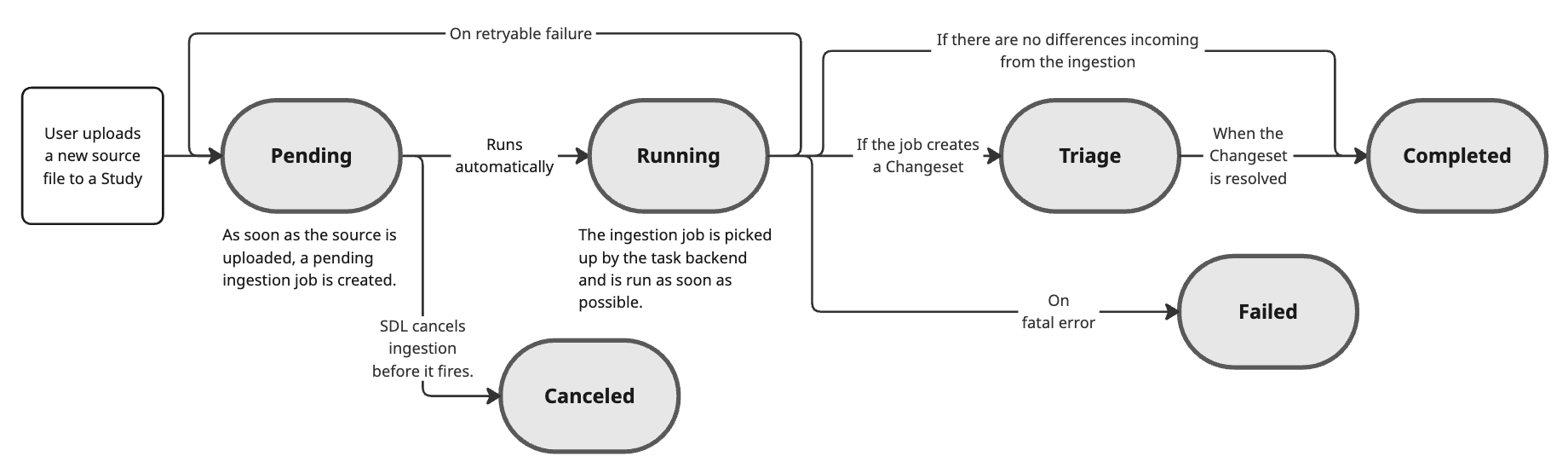
Uploading a new source file to a study creates a pending ingestion job. The task backend picks up the job and runs the extraction pipeline as soon as possible. When the pipeline finishes successfully, a Changeset is created and the job enters Triage. The job remains in Triage while that changeset is outstanding; it moves to terminal Completed once the changeset is applied, rejected, or closed.
| State | Meaning |
|---|---|
| Pending | Job is queued. Created as soon as a source file is uploaded or ingestion is re-triggered. |
| Running | The task backend is executing the extraction pipeline. |
| Triage | Pipeline finished; a Changeset has been created and is awaiting SDL review. Uploads are blocked while any job is in this state. |
| Completed | The linked changeset was applied, rejected, or closed. Terminal state. |
| Failed | Pipeline halted on a fatal error. No changeset was created. |
| Canceled | SDL canceled the job before it started running. Terminal state. |
Extraction Pipeline
For go-forward studies, the pipeline primarily relies on the Clinical SOW and Protocol as authoritative sources. The SOW provides definitive information regarding materials, kit configuration, and supply lists; the Protocol dictates the schedule of assessments (SoA) and overall study structure.
For historical studies, the pipeline also processes artifacts such as the Project Specification Document (PSD), Protocol Operations Plan (POP), Lab Manual, Kit Design File (KDF), and others to reconstruct a snapshot of the historical Study Model.
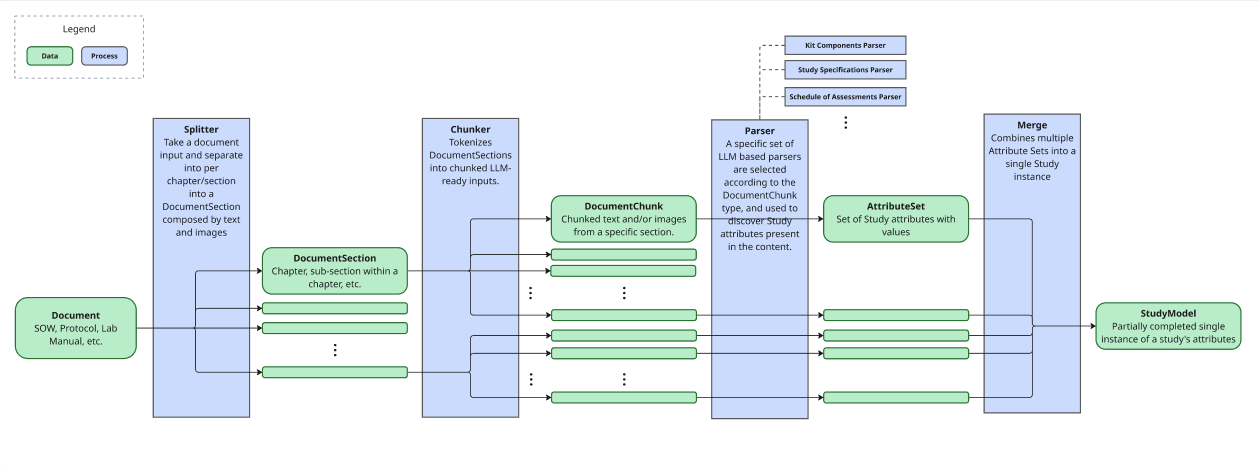
The pipeline processes documents in four stages:
- Splitter — separates a raw document into logical
DocumentSections based on chapters, subsections, and embedded images. - Chunker — tokenizes sections into
DocumentChunks sized for LLM consumption. - Parser — specialized LLM parsers (Schedule of Assessments, Kit Components, etc.) analyze chunks and produce
AttributeSets. - Diff — compares the extracted attribute set against the current Study Model checkpoint and produces a set of
add/updatechanges that seed the Changeset.
Source retention & versioning
Uploaded source documents are versioned and retained indefinitely.
- Indefinite retention. Nothing is deleted; every uploaded version is kept.
- Categorization. Sources are organized by study and document kind (e.g.,
WUC007-03 → Clinical Protocol v1, v2, v3). - Versioning. Uploading a replacement adds a new version (V2, V3, …); prior versions remain retained, viewable, and traceable. The latest version is the active source used for extraction (last-in-wins).
- Change summary. When a new version is ingested, the pipeline produces a human-readable summary of what changed from the prior version (AI-assisted), surfaced in the input document's history — a derived attribute, not a distinct domain event.
- Source versions participate in version visibility: the current version is shown by default, with prior versions available on demand.
Use Cases
- Upload SOW and Protocol source files (PDF, Word, or Excel) and associate them with a study.
- Trigger ingestion from the study Inputs tab; monitor job progress in real time.
- Cancel a pending ingestion job before it starts.
- View extraction statistics and provenance in the input document sidebar (extracted data per section, source spans, parser confidence, partial-run warnings).
- Follow the link from the job logs sidebar to the associated changeset.
- Review the ingestion-sourced changeset in the standard SDL approval flow from the Changesets module or from the Attributes tab's proposed column.
- Identify which rows in the Attributes view differ between the Study Model and a proposed ingestion changeset; approve or reject the changeset via the standard flow.
- Re-trigger ingestion after a document is replaced; no new uploads are permitted while any job is in Triage.
- View ingestion job history for a document from the input detail sidebar.
Notes
- Supported source types: PDF, Word, and Excel. PDFs may be text-bearing or scanned — scanned/image-only PDFs are OCR'd before parsing. Word and Excel are parsed via format-specific adapters (Excel may span multiple sheets). Images, PowerPoint, and any other file type are never accepted as sources; images embedded within a source are not processed — extraction reads text and tabular content only.
- One engine, both directions. A single ingestion engine serves both historical and go-forward studies — there is no separate "historical-only" engine or module. Go-forward studies typically upload SOW + Protocol and generate the rest; historical studies ingest existing artifacts (Lab Manual, PSD, POP, KDF, …). The recognized document types and their parsers are extensible — new archetypes or parsers can be added without architectural change.
- AI scope. Generative AI is used only within ingestion — to parse/extract and to summarize changes (e.g. the version-diff summaries above). There is no interactive in-app AI agent for querying studies; that remains out of scope (backlog).
- Source columns vs. proposed columns: the SOW and Protocol columns in the Attributes view display the raw extracted values for reference. The Proposed column for an ingestion-linked changeset shows what will be written to the Study Model if the changeset is applied. These are separate concerns — a source column value and its changeset proposal will typically agree, but the analyst may edit the changeset before submitting.
- Diffs are adds and updates only. An input not mentioning an attribute does not generate a removal proposal. Removals must be made manually via a changeset.
- Multiple in-flight changesets are expected (manual edits, document reviews, ingestion). Each appears as its own proposed column in the Attributes view, badged with its origin.
- Upload gate: no new ingestion job may be started for a study while any existing job is in Triage. The Run Ingestion button is disabled with an explanatory message.
- Parser runs operate at the document-chunk level. A partial run drops uncited items but still contributes its cited attributes, and a warning is recorded on the job.
- Source attribution is retained on each attribute in the extracted
AttributeSet; source spans (document, page, table index, text quote) are visible in the input detail sidebar and traceable from changeset change items.
Events
Events from the source_ingestion bounded context:
| Event | Description | Requirement |
|---|---|---|
SourceDocumentUploaded | A source file (PDF, Word, or Excel) was uploaded and attached to a study; an ingestion job was queued | SP-001 |
SourceDocumentVersionAdded | A new version of a source document was uploaded and retained (prior versions are kept); a new ingestion job was queued | SP-001 |
IngestionJobCanceled | SDL canceled a pending ingestion job before it started | SP-002 |
IngestionJobStarted | The task backend began executing the pipeline | SP-002 |
ParserRunCompleted | An individual LLM parser invocation completed (succeeded or partial) | SP-002 |
ParserRunFailed | An individual LLM parser invocation failed | SP-002 |
IngestionJobFailed | The pipeline halted with a fatal error | SP-002 |
IngestionJobTriaged | The pipeline finished; a changeset was created and the job entered Triage | SP-002, SS-004 |
IngestionJobCompleted | The linked changeset was resolved (applied, rejected, or closed); job is now terminal | SP-002, SS-004 |