Appearance
Search
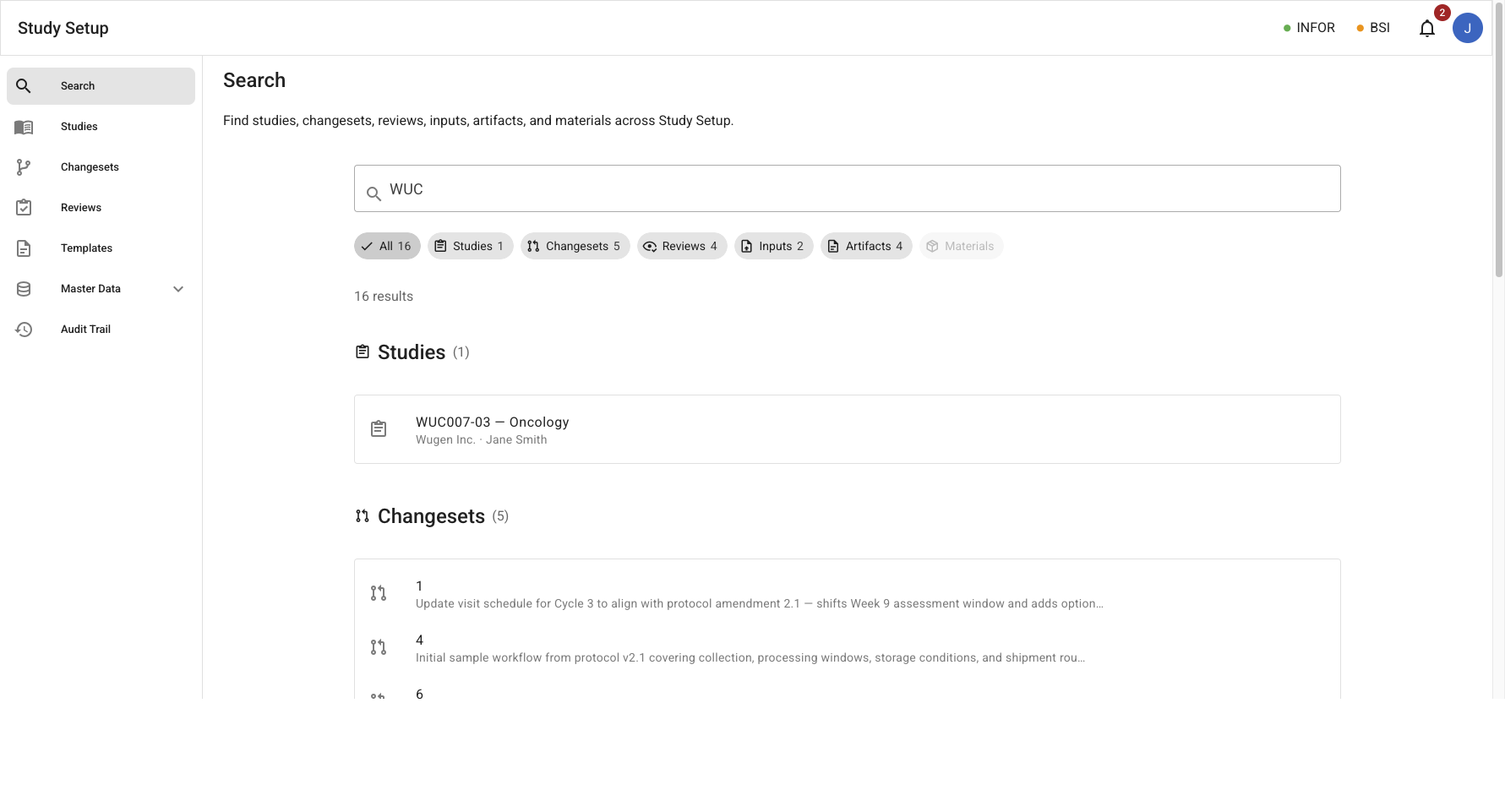
The Search module provides global, cross-entity search across the entire Study Setup corpus. A single search field queries every major entity type simultaneously; results are grouped by category and filterable via filter chips.
Mockup
Search results
/search?q=WUC – Search field with category filter chips, result count, and grouped result sections per entity type.
Entities
Search spans all major entity types in the system:
| Category | Searches | Navigates to |
|---|---|---|
| Studies | Study ID, protocol ID, name, sponsor, SDL | Study detail — Inputs tab |
| Changesets | ID, description, study, contributor, SDL | Changeset detail |
| Reviews | Review ID, document name, study, SDL, reviewer | Document view (review) |
| Inputs | Name, study, version, type (SOW / Protocol), uploader | Study detail — Inputs tab |
| Artifacts | Name, study, version, type (PSD, KDF, POP, etc.) | Study detail — Outputs tab |
| Materials | Infor item #, name, alias, manufacturer, class | Material detail |
Search result row (two-line): icon, title, subtitle (entity-specific context). Rows are clickable and navigate to the entity's detail view.
Use Cases
- Perform a global free-text search across all entity types from a single search field.
- Pre-fill a search query via the
?q=deep-link URL parameter. - Filter search results to a specific category using filter chips (Studies, Changesets, Reviews, Inputs, Artifacts, Materials).
- View result counts per category; chips with zero results are disabled.
- Navigate directly to an entity's detail view from a search result row.
- Clear the search field and reset to the empty state.
- Results show only the current version of each versioned entity by default; include draft/superseded per query via the version-visibility filter (see Version Visibility Filtering).
- Perform field-specific queries from the UI — search and filter by configured key fields (e.g., site #, sponsor, indication, protocol, assay), including finding all studies a given investigator site # participates in.
Notes
- The All category chip is selected by default and shows every matching category in separate labeled sections. Selecting a specific chip narrows results to that category only (no section header shown).
- Filter chips appear only after the user has typed a query. Before any input, an empty-state prompt is shown.
- When a query matches no entities, a no-results empty state is shown.
- The search is implemented as a client-side filter across static mock data in the current mockup (
src/utils/search.ts). Production search would be backed by a server-side full-text index. - Search queries are matched against normalized text fields; partial matches and alias matching (for materials) are supported.
- The set of searchable key fields is defined in application settings (
settings.py) for now; users issue field-specific queries against them through the UI. Making the key-field set runtime-configurable is a future enhancement (low priority — tracked in Linear). Results remain permission-scoped (only studies the user may access).
Events
TBD — no
searchdomain event files have been defined yet indocs/events/domains/.
Potential events to define when the search domain is formalized:
| Event | Description | Requirement |
|---|---|---|
SearchQueryExecuted | A user executed a search query with result counts per category | SE-001, SE-002, SE-003 |
SearchResultNavigated | A user clicked a search result row and navigated to an entity | SE-001, SE-002, SE-003 |