Appearance
Document Review
The Document Review module manages the full validation lifecycle for study output documents (PSD, KDF, POP, Lab Manual, etc.): from detecting that a document has drifted from its last released version, through internal peer review, to external sponsor review, and finally to versioned release.
There are two distinct types of review, with different subjects and workflows:
Internal Reviews
Internal Reviews let the SDL formally request feedback from internal users — a lightweight process in preparation for a customer-facing review.
- The SDL can request review of a Document from internal users at any time, with an optional soft deadline.
- Reviewers work against the live document preview and submit comments and proposed changesets to the Study Model.
- If the Study Model is updated, reviewers see those updates in the live preview as they occur. Comments, changesets, and the review itself survive the update.
- Reviewers confirm in the app when they have completed their review; they may do so at any time.
- The app informs reviewers of new/pending reviews and approaching deadlines.
Release Process
A release is the generation and distribution of a new Document Version to the customer. Releases are per document: the SDL releases each Document (e.g. the PSD) independently.
- The SDL may "start" a release for a Document at any time. This creates a new Document Version (e.g. PSD – V2) in the open state, with no physical document attached yet.
- The SDL may cut a Release Candidate for the open Document Version from the current Study Model checkpoint. At most one Release Candidate is active per Document Version; successive candidates are numbered rev 1, rev 2, … (display: "PSD – V2 – rev 1").
- A Release Candidate stays at its checkpoint even as the Study Model moves on; the SDL either sees it through or withdraws it.
- The SDL may assign external reviewers to the Release Candidate and share their secure links via email.
- External reviewers may submit comments, and may record their approval. Approvals are informational: surfaced to the SDL, gating nothing.
- The SDL may reply to comment threads and/or mark them resolved.
- The SDL may "reject" a Release Candidate that is not ready for release. A new candidate (rev N+1) may then be cut from the latest checkpoint for the same Document Version.
- The SDL may "accept" a Release Candidate, signalling it is ready for release.
- The SDL may "release" an accepted Release Candidate once all its comments are dispositioned. Its rendering becomes the released Document Version, and no further candidates may be cut for that version.
Mockup
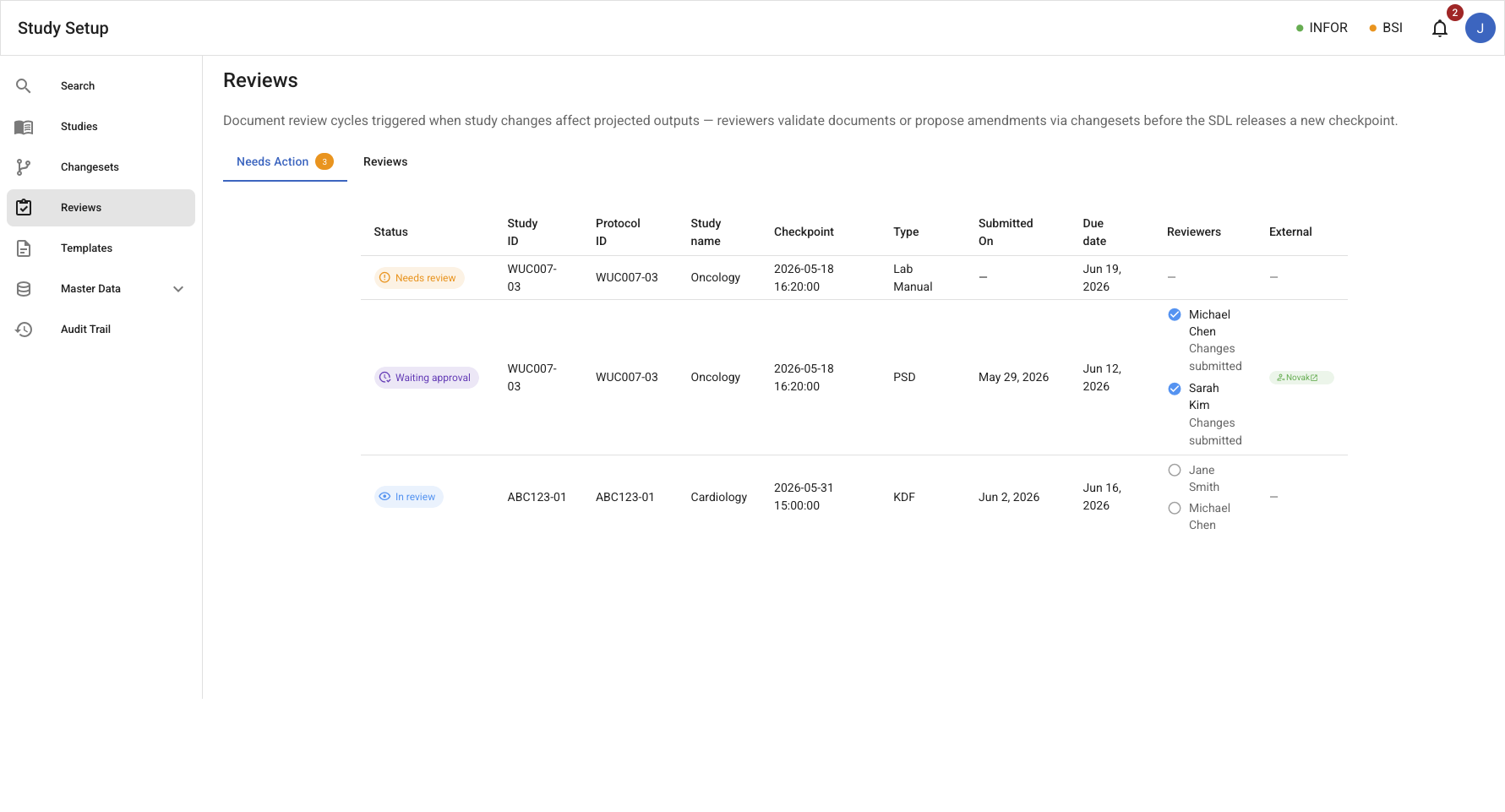
Reviews – Needs Action tab
/reviews/needs-action – Filtered table showing Internal Reviews and Release Candidates where the current user has a pending responsibility.
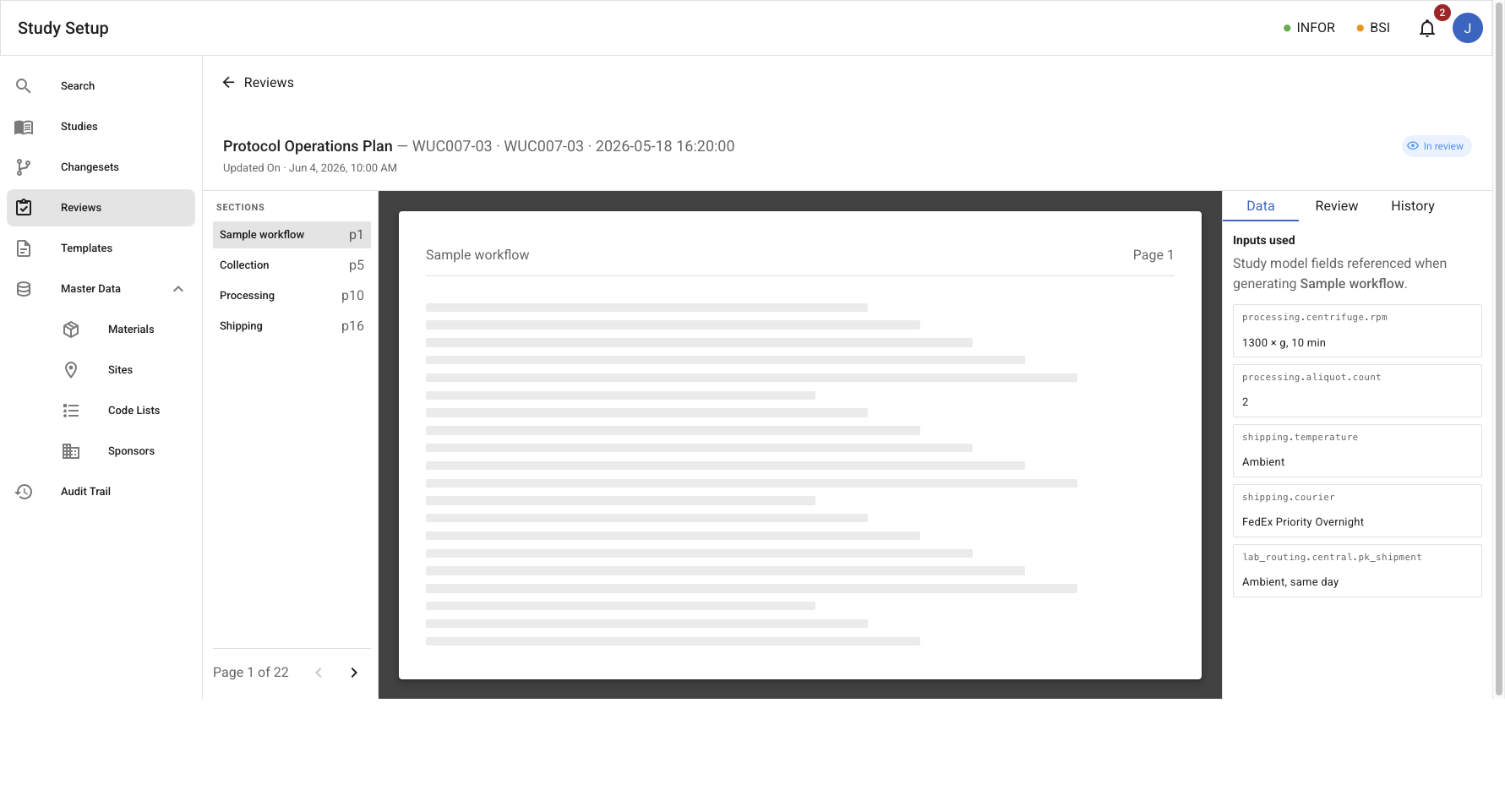
Review document view
/reviews/:id – Shared Document view with a three-tab side panel (Data, Review, History). For an Internal Review the Review tab shows the assignment list, linked changesets, and comment threads. For a Release Candidate it shows the RC metadata, external reviewer grant statuses, and comment threads with dispositions.
External review site
/external/:token – Standalone chrome-less experience for external reviewers. Accessed via an email-verified secure link; shows the RC document preview, a comments panel, and a deadline banner.
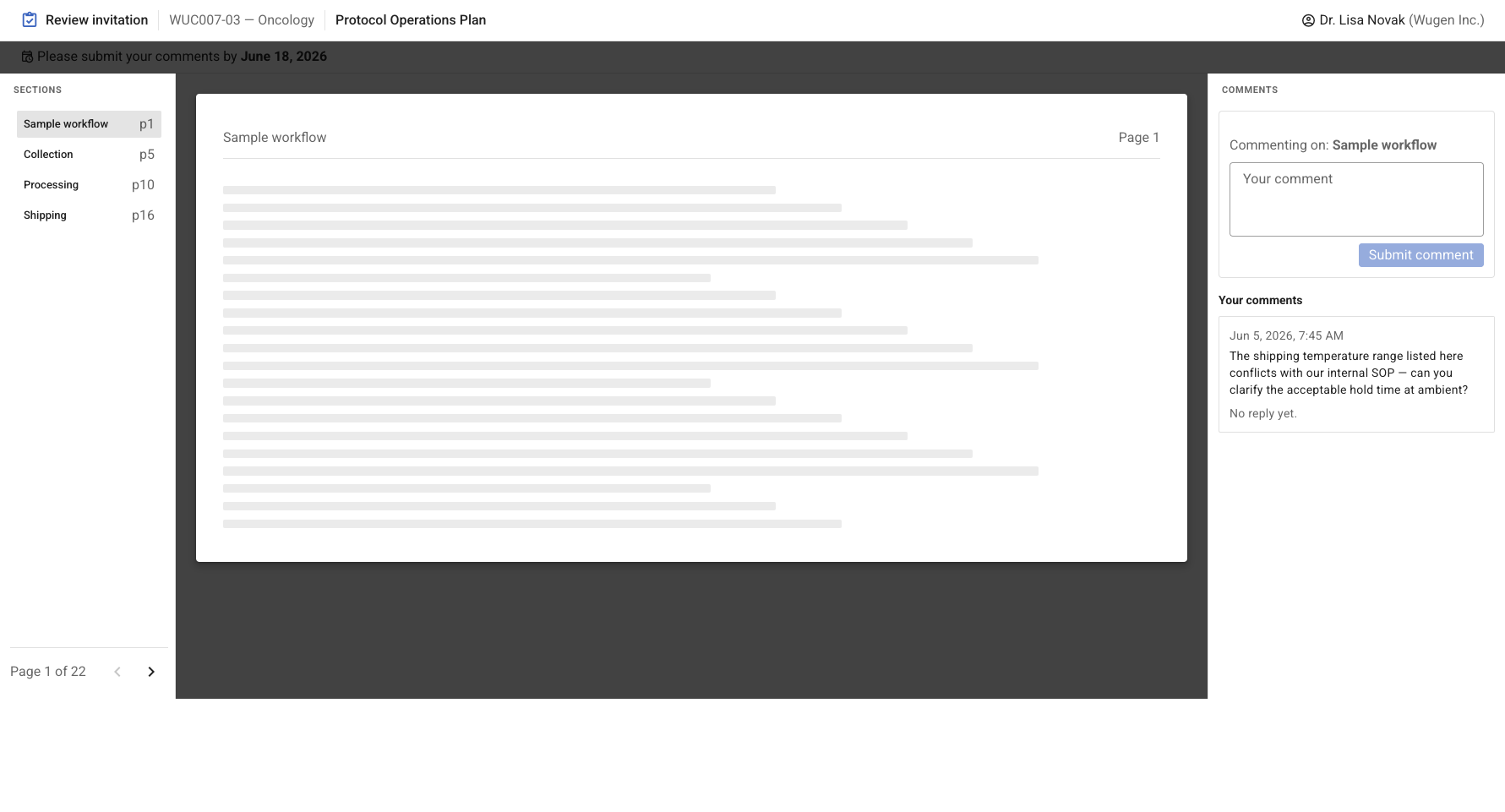
The client-facing portal is defined as its own module — see External Client Review Portal.
The Document entity
A Document is the long-lived identity for a study output: one per study × document type (equivalent to a Study Output as defined in Studies). The Document owns the version history (all Document Versions — open, released, and superseded — together with their Release Candidates) and carries a derived staleness flag:
A Document is stale when the Study Model has changed, since the checkpoint of the latest released Document Version, in fields that are mapped (model-bound) in the document's template.
Staleness is a condition, not a lifecycle state: it surfaces as an indicator in the Outputs tab and in the Needs Action feed, prompting the SDL to initiate a review cycle. It does not block any action.
Entities
| Entity | Description |
|---|---|
| Document | Long-lived identity for a study output (see above). |
| Internal Review | A review cycle sent to a set of internal users who review the document's live preview. Not checkpoint-pinned. |
| Reviewer Assignment | One internal user's participation in an Internal Review. The reviewer submits an assessment (no changes / changes proposed / comments only) and may attach comments. |
| Release Candidate (RC) | An immutable rendering of the Document at a specific checkpoint + template version, cut as a candidate for an open Document Version. |
| External Reviewer Grant | Per-reviewer access record for a Release Candidate: email, organization, email-verified secure token, deadline, revocation, and recorded approval. |
| Document Version | A version slot (V1, V2, …) created when the SDL starts a release for a Document. Open until an accepted RC is released into it. Carries export, distribution, and ZenQMS/DocuSign handoff status. |
| Comment | A threaded annotation anchored to a document section, in the context of either an Internal Review (by internal users) or a Release Candidate (by external reviewers). Has its own disposition lifecycle. |
See also: Changeset in Studies.
State models
Internal Review
| State | Meaning |
|---|---|
| open | Review is in progress; reviewers are working against the live document preview. |
| completed | All assignments submitted; terminal. |
| cancelled | SDL withdrew the review; terminal. |
Internal Review transitions
| From | Action | Actor | To |
|---|---|---|---|
| open | All assignments submitted | System | completed |
| open | Cancel review | SDL | cancelled |
An Internal Review survives checkpoint changes. If the Study Model changes while a review is open, assigned reviewers receive a notification; they continue against the updated live preview.
Reviewer Assignment states
| State | Meaning |
|---|---|
| pending | The reviewer has been assigned but has not yet submitted. |
| submitted | The reviewer has submitted their assessment: no_changes, changes_proposed, or comments_only. |
| withdrawn | The reviewer was removed from the review by the SDL. |
Submitting an assessment signals the reviewer has finished their primary evaluation; they may keep adding comments while the review remains open.
Release Candidate
| State | Meaning |
|---|---|
| open | The RC has been cut at a checkpoint; external review is in progress. |
| accepted | SDL has accepted the RC; it is eligible for release. |
| rejected | SDL determined the RC is not ready for release; closed for new activity. A new RC (rev N+1) may be cut for the same Document Version. |
| withdrawn | SDL withdrew the RC without a decision; terminal. |
Release Candidate transitions
| From | Action | Actor | To |
|---|---|---|---|
| open | Accept | SDL | accepted |
| open | Reject | SDL | rejected |
| open | Withdraw | SDL | withdrawn |
Releasing is a separate action taken on an accepted RC, and requires that all Comments on the RC are dispositioned (resolved, will_apply, or will_discard).
Document Version
| State | Meaning |
|---|---|
| open | The version slot exists; Release Candidates are cut to fill it. No physical document attached yet. |
| released | An accepted RC was released into this slot; its rendering is the physical document. The canonical, active version, eligible for export, distribution, and handoff. |
| superseded | A newer version has been released; retained for traceability. Terminal. |
Document Version transitions
| From | Action | Actor | To |
|---|---|---|---|
| — | Start a release for the Document | SDL | open |
| open | Accepted RC released into the slot | SDL | released |
| released | Newer version released | System | superseded |
Comment disposition lifecycle
Comments exist in either an Internal Review or a Release Candidate (external comments only). Disposition is performed by internal users.
| State | Meaning |
|---|---|
| open | Comment submitted; awaiting response. |
| replied | An internal user has replied, but the thread is still open. |
| resolved | Thread marked resolved (no action required). |
| will_apply | The feedback will be incorporated as a model change (via Changeset). |
| will_discard | The feedback was considered and will not be incorporated. |
End-to-end cycle
The lifecycle for a single document, as a swimlane (SDL / Study Model / Document Versions / Release Candidates / External Reviewers):
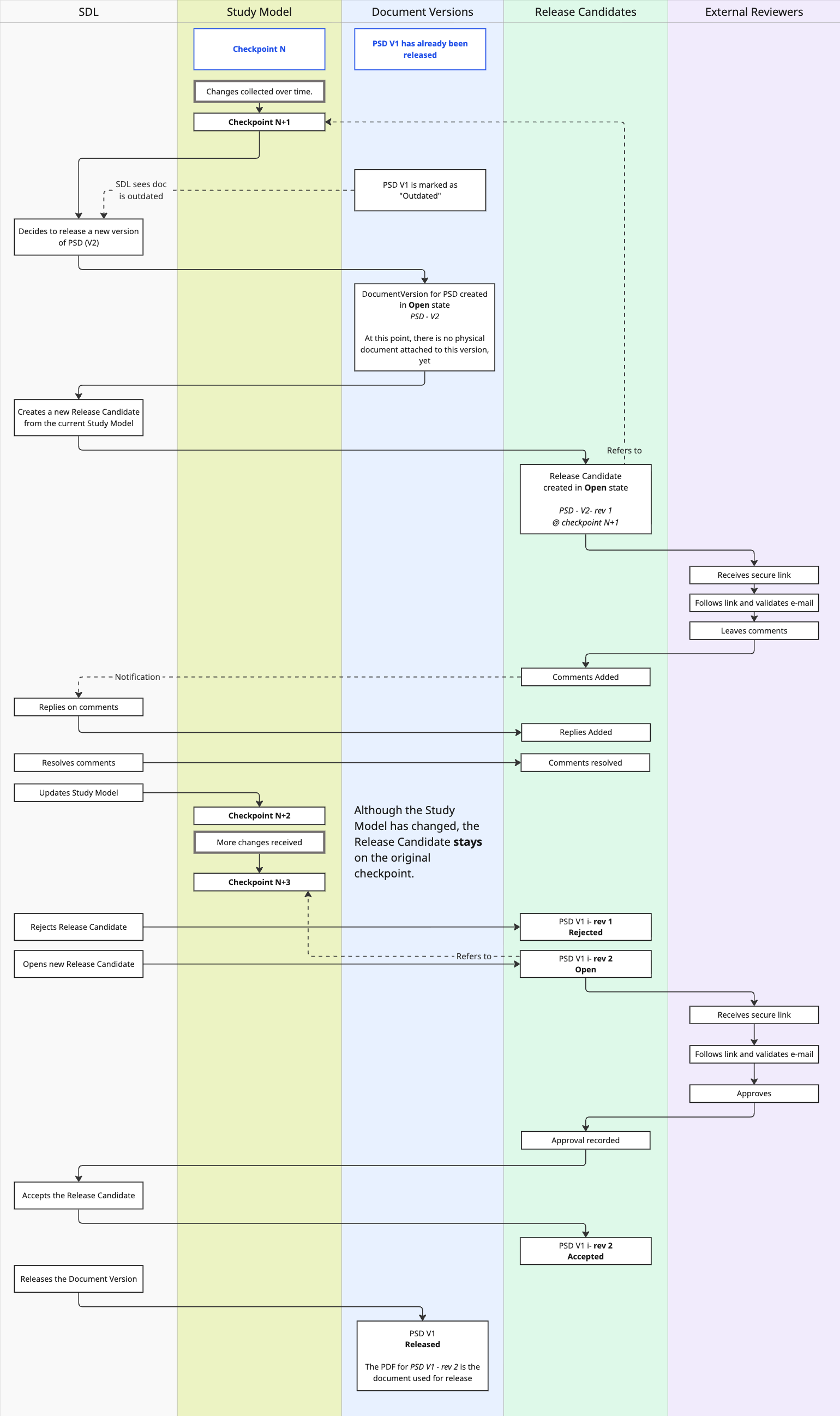
An Internal Review is not a gate for starting a release: the SDL may start one at any time. The UI suggests an internal review whenever the document is stale, but neither blocks the other.
Use Cases
- See documents that have drifted from their last released version (Needs Action feed, Outputs tab staleness indicator).
- Open an Internal Review for a stale document, assigning one or more internal reviewers.
- As a reviewer, review the live document preview alongside the Study Model data, and submit an assessment (no changes, changes proposed, or comments only).
- Propose model changes from the document preview (creates a Changeset in the normal changeset flow).
- Add threaded comments to a document section during an Internal Review.
- Cancel an in-progress Internal Review.
- Start a release for a Document, creating a new open Document Version (e.g. V2).
- Cut a Release Candidate (rev N) for an open Document Version at the current checkpoint.
- Invite external (client/sponsor) reviewers by name, email, and organization; they receive an email-verified secure link scoped to that RC.
- Revoke an external reviewer's access at any time.
- As an external reviewer, access the RC document via the secure link after email verification, and submit section comments.
- As an external reviewer, record approval of the RC.
- Browse and reply to external comments; disposition each (resolved / will_apply / will_discard).
- Set a review deadline on an Internal Review or RC; receive notifications when a deadline is approaching or past — via the
ReviewDeadlineApproaching/ReviewDeadlinePassedevents emitted by a scheduled check (no automated state change). - Accept or reject a Release Candidate as SDL.
- Release an accepted RC (with all comments dispositioned) into its Document Version.
- Export a Document Version as a PDF. Every page is watermarked with a footer line —
{StudyID} · {DocumentType} · {VersionLabel} · {ReleaseStatus} · Checkpoint {CheckpointId} · Exported {ExportedAt UTC} by {Actor} · Uncontrolled when printed— and non-released exports additionally carry a diagonal {ReleaseStatus} — NOT FOR USE stamp. Watermarking follows the ZenQMS convention as the reference example. - View a Document's export register — who exported which Document Version, in what format, and when — so lab leaders can monitor export activity and catch cases where an outdated version is still circulating.
- Record ZenQMS/DocuSign handoff or signature status on a Document Version.
- Distribute an exported Document Version to recipients.
- Log client feedback received outside Study Setup and associate it with the correct Document Version.
- Browse all Internal Reviews and Release Candidates across the system (Reviews list tab), filterable by type, status, and study.
- Navigate directly to any review from the Needs Action tab.
Notes
- Roles: the SDL drives every state transition (opening internal reviews, starting releases, cutting RCs, inviting/revoking external reviewers, dispositioning comments, accepting/rejecting/releasing RCs). Internal reviewers submit assessments and comments; external reviewers submit comments and approvals.
- Study lifecycle interaction: when a study is Frozen, no new Changesets may be submitted or applied, so no new checkpoints are created. Internal Reviews and RC activity continue unaffected. The SDL typically freezes a study when review cycles are converging, to prevent concurrent model changes. See Studies.
- External access: each External Reviewer Grant produces a unique secure token. The reviewer's browser session is bound to their email address via a one-time verification step on first access. Expired, revoked, or unknown tokens show a friendly empty state.
- Version numbers are not reused: if an RC is rejected or withdrawn, the next candidate for the same open version slot is numbered "V2 – rev 2"; the slot keeps its version number.
- Staleness precision: boilerplate and non-mapped template sections do not contribute to staleness — only model-bound fields, compared between the latest released version's checkpoint and the current one.
- Handoff and export apply to Document Versions, not to RCs or reviews.
- Comments outside reviews: internal users may comment on a document at any time while the study is Active or Frozen, independently of any open Internal Review; these comments appear in the document's comment history.
- Watermark & export register: PDF exports are never unmarked — released exports carry the footer watermark; draft/RC exports add the diagonal "not for use" stamp. The export register (who exported which Document Version, when) is a derived view of
DocumentVersionExportedevents, reviewable per Document and per study.
Events
Events from the artifact_generation_review bounded context (review and version lifecycle):
| Event | Description |
|---|---|
InternalReviewOpened | An Internal Review was opened for a Document |
ReviewerAssigned | An internal user was assigned to an Internal Review |
ReviewerAssessmentSubmitted | A reviewer submitted their assessment on an Internal Review |
InternalReviewCompleted | All reviewer assignments on an Internal Review were submitted |
InternalReviewCancelled | An Internal Review was cancelled by the SDL |
ReviewDeadlineApproaching | A scheduled check found an Internal Review or RC deadline is approaching |
ReviewDeadlinePassed | A scheduled check found an Internal Review or RC deadline has passed |
ReleaseStarted | A release was started for a Document, creating a new Document Version in the open state |
ReleaseCandidateCut | An RC was cut at a specific checkpoint for an open Document Version |
ExternalReviewerInvited | An External Reviewer Grant was created and an invitation sent |
ExternalReviewerVerified | An external reviewer completed email verification and accessed the RC |
ExternalCommentSubmitted | An external reviewer submitted a comment on an RC |
ExternalApprovalSubmitted | An external reviewer recorded approval of an RC |
CommentDispositioned | An internal user dispositioned a comment (resolved / will_apply / will_discard) |
ReleaseCandidateResolved | An RC reached a terminal state: accepted, rejected, or withdrawn |
DocumentVersionReleased | An accepted RC was released as the Document Version |
DocumentVersionSuperseded | A prior Document Version was superseded by a newer release |
HandoffStatusRecorded | A ZenQMS/DocuSign handoff or signature status was recorded on a Document Version |
DocumentVersionExported | A Document Version was exported as a PDF — records version, source checkpoint, release status, watermark metadata, format, and actor. Raised by the ExportDocumentVersion command; the export register is the derived view of these events. |
DocumentDistributionPrepared | An exported Document Version was prepared for email distribution |
OfflineFeedbackLogged | Client feedback received outside Study Setup was logged and associated with a Document Version |
Template lifecycle events (TemplateCreated, TemplateUpdated, etc.) are also owned by the artifact_generation_review bounded context; see Templates.
Artifact generation events (ArtifactGenerated, ArtifactEdited, ArtifactVersionLinked) are produced when a Document preview or RC is rendered; see Templates.
Pending definitions
- Criteria and UX for automatically suggesting or assigning reviewers to a given Internal Review
- Deadline-alert cadence and notification targeting (who is alerted, how far in advance)
- Maximum RC lifetime and token expiry policy for External Reviewer Grants
- DocuSign integration and handoff status recording